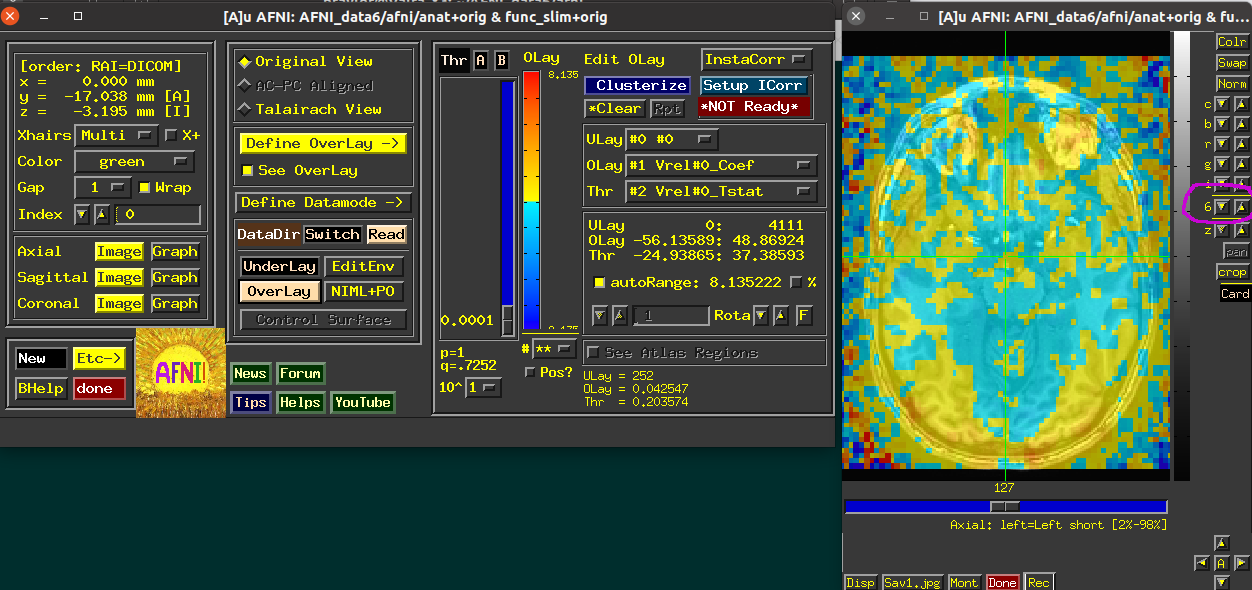
My supervisor and I opened the same AFNI analysis directory and viewed the same datasets and sub-bricks. We both selected the Reds_and_Blues_Inv color bar, but the overlay colors appear different. His colors look darker and more saturated, while mine look lighter.
On my AFNI, I confirmed the following:
Alpha fading is off
Overlay opacity is set to 6
Color-bar mode is continuous (#**)
auto range is selected and currently displays 1.538616
The same overlay and threshold sub-bricks are selected
Could this difference be caused by another GUI setting, a user-specific setting, different AFNI versions, or display rendering? Are there any additional settings we should compare to ensure that the same values are mapped to exactly the same colors?
Thank you in advance for your guidance! Do let me know if you need any additional information.
Can you please take a snapshot of what you are seeing (both cases)? It would help to have both the image panels and the AFNI controller in the views.
And just to check, do you have the same overlay max opacity value, as highlighted with the pink circle here, in the up/down settings at the right of the image?
Besides these settings within AFNI, there is also the possibility the display settings or monitor are behaving differently. Displays are typically not color calibrated, and different display settings or profiles can vary from one computer to another. Monitors can vary dramatically too with different settings for vivid colors or differing gamma values. You can also configure some X11 settings to only have a limited number of colors. On a Mac, you can set XQuartz to have only 256 colors, thousands of colors or millions of colors.
The
National Institute of Mental Health (NIMH) is part of the National Institutes of
Health (NIH), a component of the U.S. Department of Health and Human
Services.