partial coverage alignment failure - follow-up

AFNI version info (afni -ver):
Precompiled binary linux_ubuntu_16_64: May 23 2025 (Version AFNI_25.1.11 'Maximinus')

Dear AFNI,
I am following up on the forum thread partial coverage alignment failure from January 2024 that seemed to stop because of technical issues. I am having a very similar issue since I am also trying to acquire a few BOLD fMRI slices including the hippocampus.I have only tried afni_proc so far, both on MNI (i.e. with tlrc option) and on subject space (ithout tlrc option). Unless you think it would be better to focus on MNI script, I will focus on T1w space since I am running only one participant to tune the parameters for now.

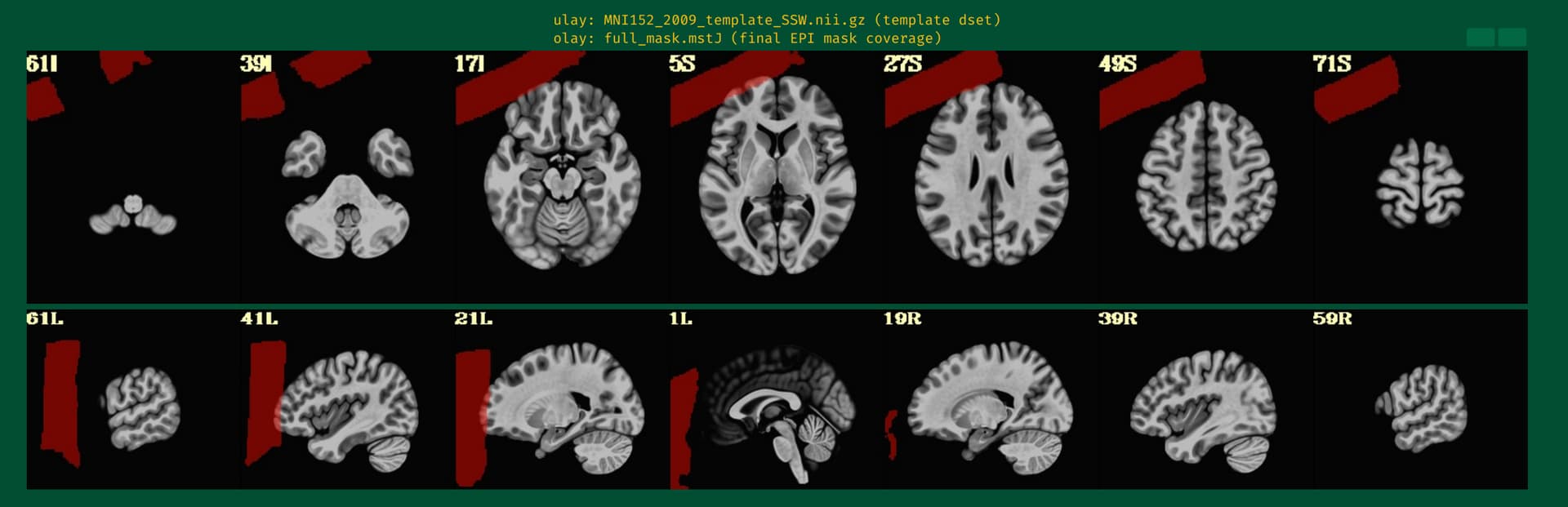
This is the beginning of output. When checking the volumes in original space, the images when applying obliquity look almost correct. That's what I acquired.
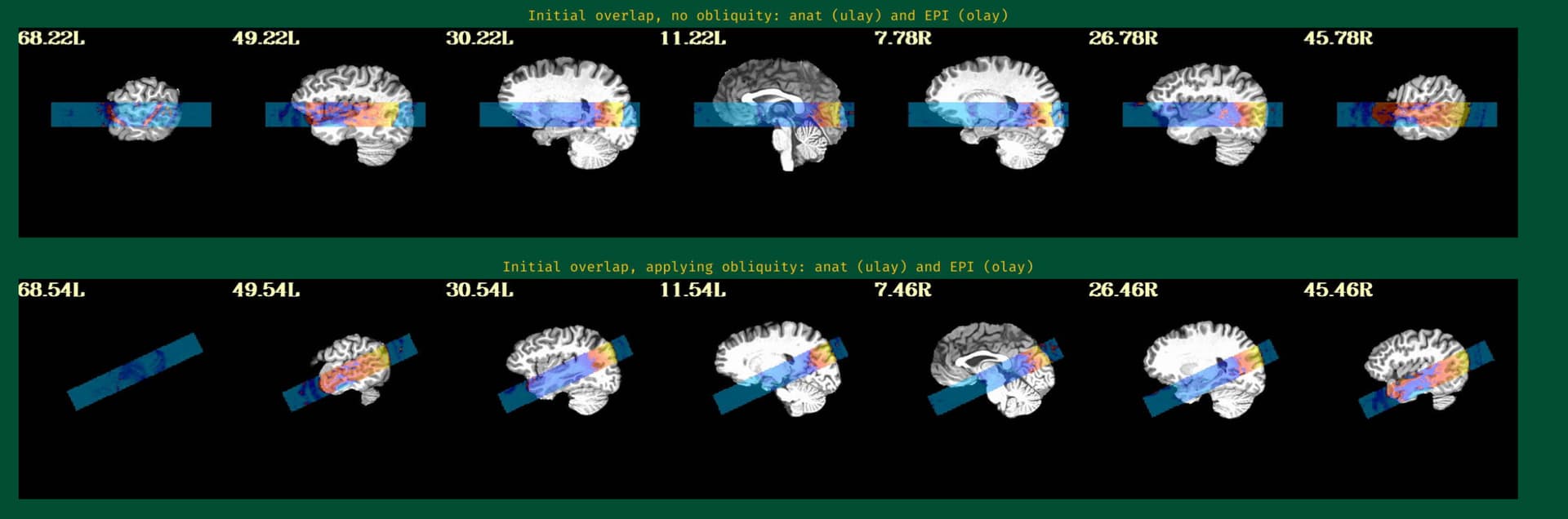
But when checking for EPI to Anat alignment, it looks like follows (almost like applying re-obliquing twice):
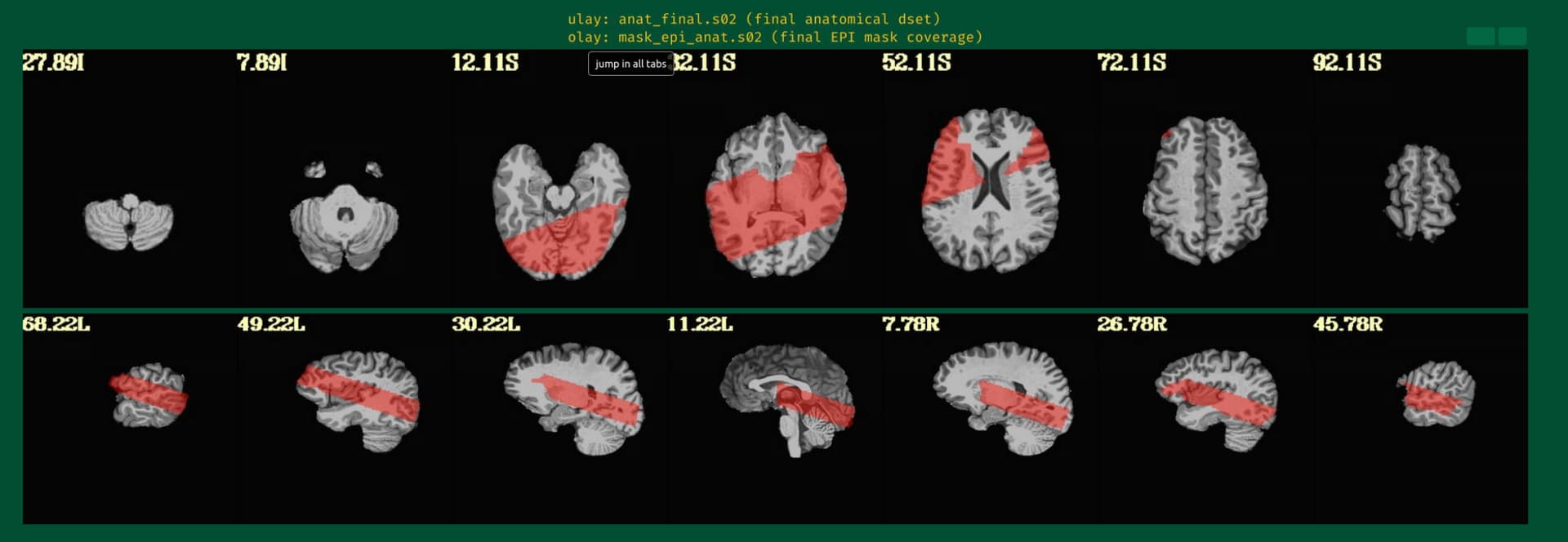
As an answer to the previous thread I am following, this is the output of

3dinfo -obliquity -prefix anat_final.s02+orig final_epi_vr_base_min_outlier+orig 
9.366	                    anat_final.s02
0.000	     final_epi_vr_base_min_outlier

and

@djunct_overlap_check                                           \
    -ulay    anat_final.s02+orig                                          \
    -olay    final_epi_vr_base_min_outlier+orig                                          \
    -prefix  img_olap

returned

# ulay         = anat_final.s02+orig
# ulay_is_obl  = 1
# ulay_obl_ang = 9.366
# mat44 Obliquity Transformation ::
      0.995392      0.007651     -0.095584     -11.890205
     -0.020267      0.991080     -0.131722     -12.362091
      0.093724      0.133052      0.986668     -28.940544
# 
# olay         = final_epi_vr_base_min_outlier+orig
# olay_is_obl  = 1
# olay_obl_ang = 9.366
# mat44 Obliquity Transformation ::
      1.000000      0.000000      0.000000      -0.000008
      0.000000      1.000000      0.000000       0.000000
      0.000000      0.000000      1.000000       0.000000

with following images:
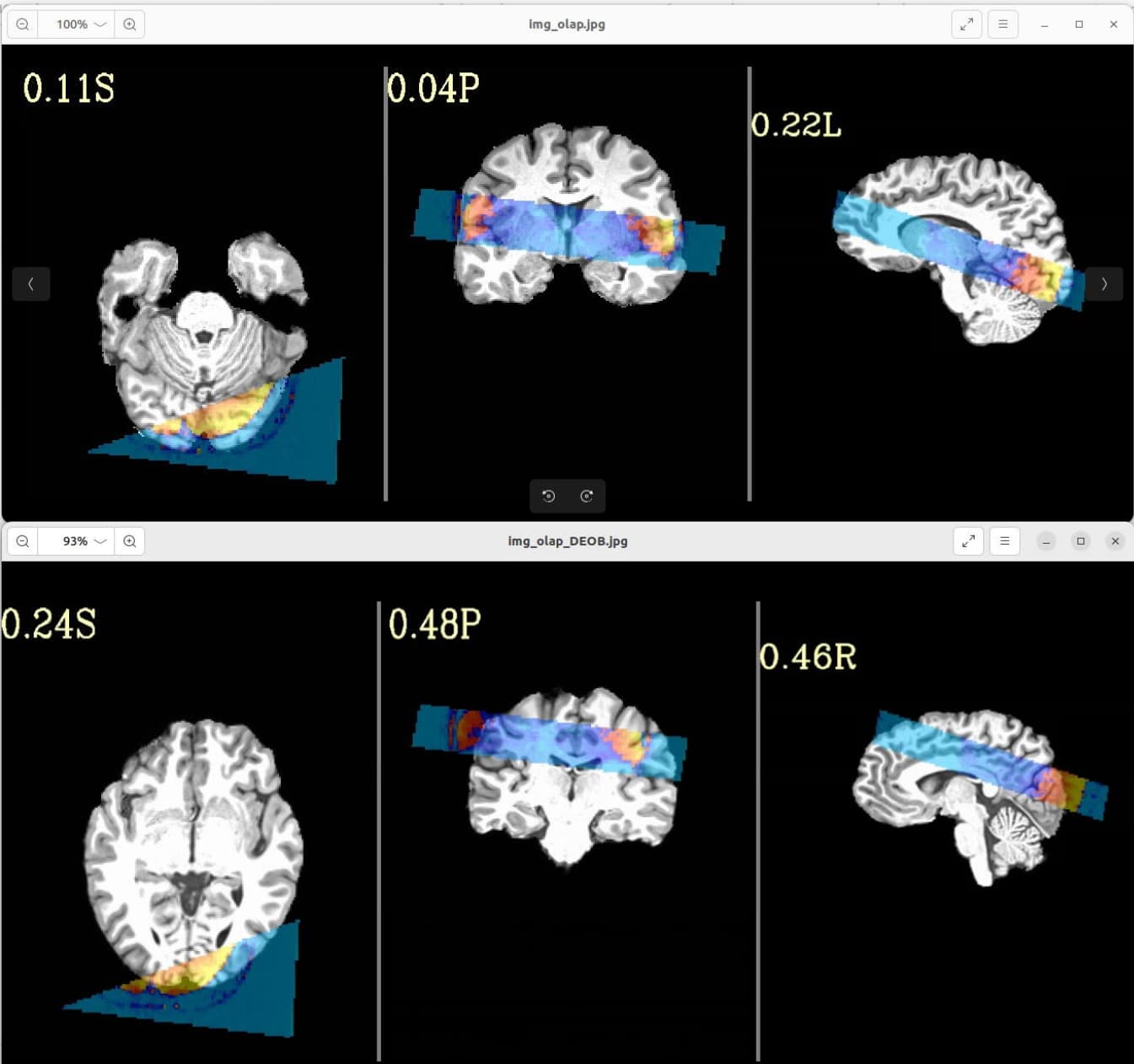
Where the DEOB doesn't seem to be correct.

Is there a possibility to include a full brain volume (which I acquired on many more slices and totally aligned with the time series focused on hippocampus) in the afni_proc command or have I done any mistake in my command which follows?

afni_proc.py                                                         \
            -subj_id                  s02 \
            -out_dir			$subdir/S02e.results	\
            -copy_anat $subdir/o.ssw_sub-mst/anatSS.sub-mst.nii \
            -anat_has_skull           no                                     \
            -anat_follower anat_w_skull anat $subdir/sub-mst_T1w.nii.gz \
            -dsets $subdir/sub-mst_task-cmrr_run-01_bold.nii.gz \
            -blocks                   align volreg mask blur     \
                                      scale regress                          \
            -radial_correlate_blocks  tcat volreg                            \
            -tcat_remove_first_trs    0                                      \
            -align_unifize_epi        local                                  \
            -align_opts_aea           -cost lpc+ZZ                           \
                                      -giant_move                            \
                                      -check_flip                            \
            -volreg_align_to          MIN_OUTLIER                            \
            -volreg_align_e2a                                                \
            -volreg_compute_tsnr      yes                                    \
            -mask_epi_anat            yes                                    \
            -blur_size                3.0                                    \
            -regress_stim_times       $subdir/rep.1D           \
            				$subdir/new.1D         \
            -regress_stim_labels      rep new                                \
            -regress_basis_multi      'TENT(0,16,7)' 'TENT(0,16,7)'          \
            -regress_opts_3dD         -jobs 8                                \
                                      -gltsym 'SYM: rep - new'               \
                                      -glt_label 1 r-n                       \
            -regress_motion_per_run                                          \
            -regress_censor_motion    0.3                                    \
            -regress_censor_outliers  0.05                                   \
            -regress_3dD_stop                                                \
            -regress_reml_exec                                               \
            -regress_compute_fitts                                           \
            -regress_make_ideal_sum   sum_ideal.1D                           \
            -regress_est_blur_epits                                          \
            -regress_est_blur_errts                                          \
            -regress_run_clustsim     no                                     \
            -html_review_style        pythonic                               \
            -execute

Thanks!
Jonathan
hi there Jonathan-

i'm sure you'll get great feedback from the AFNI developers themselves, but since i've done so much AFNI work with small FOVs (and know how super frustrating it can be) i'll chime in. it looks to me like the align_epi_anat.py defaults are throwing your FOV out of registration. i'd like to share my experiences and advice when this happens to me.

First, get out of afni_proc for a second to speed up the troubleshooting. zero in on this alignment issue with align_epi_anat.py, the program afni_proc calls.

Second, align_epi_anat.py (aea) can be thought of a wrapper around the real workhorse 3dAllineate. i think you should refine your aea command with some deeper constraints to 3dAllineate. there are many of these: -maxrot, -maxshf, -maxscl etc.. you might also want to constrain an initial alignment as rigid body ("-warp shift_rotate").

Third, when you've found a set of parameters that work (and there are many GUI ways to check alignment carefully; you don't necessarily need the afni_proc html images for that), you can place the parameter constraints back into your afni_proc command with something like:

            -align_opts_aea -cost lpc+ZZ -check_flip \
			-Allineate_opts -warp shift_rotate -maxrot 5

this process may be a little more time consuming than testing aea's built-in options like -big_move, -giant_move, -large_move etc, but i've found it's quite flexible and robust to wrangling the most difficult datasets. hope this helps and let me know if you have further questions.

-Sam

Dear Sam,

Thank you for your answer.

I guess the align_epi_anat.py that has to be tuned is the following in the proc file generated by afni_proc:

align_epi_anat.py -anat2epi -anat anatSS.sub-mst+orig  \
       -suffix _al_junk                                \
       -epi vr_base_min_outlier_unif+orig -epi_base 0  \
       -epi_strip 3dAutomask                           \
       -anat_has_skull no                              \
       -cost lpc+ZZ -giant_move -check_flip            \
       -volreg off -tshift off

since the "al_junk" file in ouput is misaligned when I check the registration.

I am dealing with 3dAllineate right now tuning -maxrot, -maxshl, etc., but so far I am not succesful. I will still try a little more.

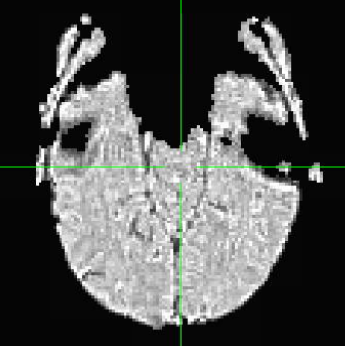
This being said, when I am looking at the vr_base_min_outlier_unif (picture below), I wonder if the non brain parts are the origin of the problem:

Jonathan

you may also want to try removing "-align_unifize_epi" from your original afni_proc to retain tissue contrast in the vr_base

Partial data like this can be difficult, especially with strong gradients and little structure and tissue contrast. I will add to Sam's recommendations to try a couple more things:

  1. Use -partial_xxx options to control the cmass moves.
  2. Remove -giant_move because they start out close after the deobliquing step.
  3. Tweak align_epi_anat.py options with other cost functions like nmi or lpa+ZZ for low tissue contrast data. Remove the automask option here too.
  4. You can use the full brain EPI dataset instead (if I understand correctly that you do have one) as long as it's aligned with a particular EPI subbrick volume. Select the full brain align_epi_ext_dset. Select the volreg base for motion correction specifically with the options -volreg_align_to, -volreg_base_dset and -volreg_base_ind.
1 Like

Well, I think I might have something that will help navigate dealing with obliquity and the initial spatial overlap better, which should in turn help the alignment itself. Let me see if I can finally finish it and put it into the build today (or thereabouts...).

--pt

1 Like

I have tweaked parameters in 3dAllineate, align_epi_anat and afni_proc. It seems to work if I run afni_proc with "align_epi_ext_dset" to my whole brain volume. If I remember correctly I first had to import dicoms with Dimon (instead of running on existing Niftis) and run 3dWarp -deoblique.

So what I am assuming is that there is no motion between the full volume and the last volume of the time series (after dummies).

afni_proc.py                                                         \
            -subj_id                  mstC \
            -out_dir			$subdir/mstC.results	\
            -copy_anat $subdir/anatSS.sub-mst.nii \
            -anat_has_skull           no                                     \
            -anat_follower anat_w_skull anat $subdir/struct+orig \
            -dsets $subdir/cmrr+orig \
            -blocks                   align volreg mask blur     \
                                      scale regress                          \
            -radial_correlate_blocks  tcat volreg                            \
            -tcat_remove_first_trs    0                                      \
            -align_unifize_epi        local                                  \
            -align_opts_aea           -cost lpc+ZZ                           \
                                      -check_flip                            \
            -align_epi_ext_dset       "$subdir/whole+orig[4]"                \
            -volreg_align_to          first                                   \
            -volreg_align_e2a                                                \
            -volreg_compute_tsnr      yes                                    \
            -mask_epi_anat            yes                                    \
            -mask_apply               epi                                    \
            -blur_size                3.0                                    \
...etc

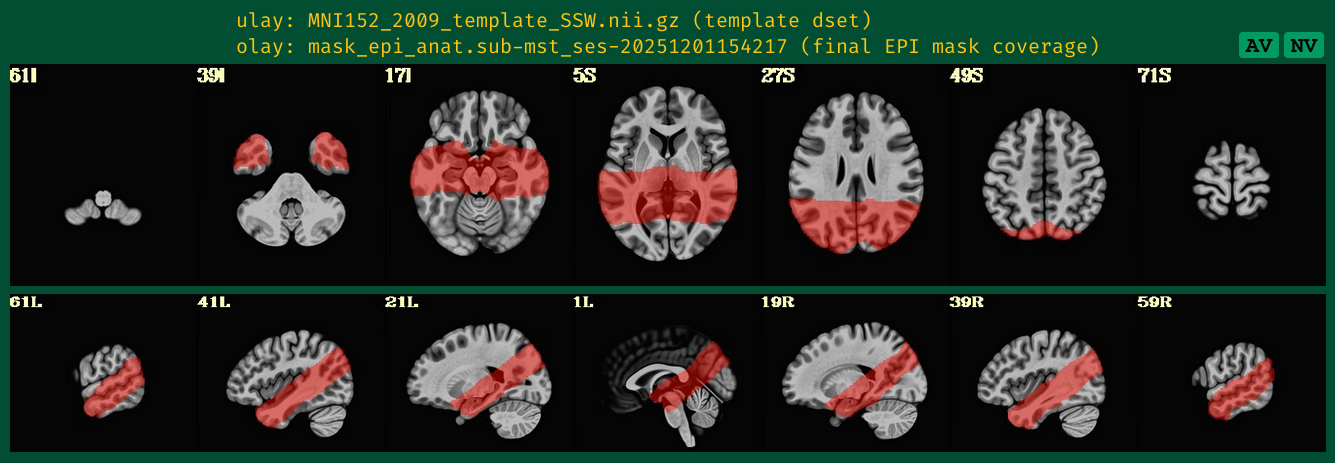
This seems good. I think you meant "first" volume after the dummy scans because that's the way you scripted it. The mask display provides an overall view, but the edgier ve2a section in the QC report with EPI data and anat edges shows more detail.

Hi again-

OK, there is now a new program in the distribution called obliquity_remover.py as of version 25.3.03. Could you please update your AFNI to at least that?

This program provides the same utility for removing obliquity from the anatomical (without blurring and with preservation of the input dset's coordinate origin), but it adds a new useful functionality: you can provide a set of "child" datasets that will inherit that obliquity themselves. Specifically, that obliquity gets concatenated to whatever obliquity they already have (whether it is zero or nonzero), so that the relative overlap of the input and child datasets is preserved. This is particularly useful when removing obliquity from a participant's anatomical, as you can provide the EPI and other datasets from the same session as child datasets, so that EPI-anatomical overlaps start off in as good a spot as possible within afni_proc.py processing. (The align_epi_anat.py program that actually does the EPI-anatomical alignment within AP processing actually does apply any obliquities available within datasets, so this will matter+help in the alignment even if it doesn't exactly look that way in the GUI, which ignores the obliquity when displaying the volumes.)

For most datasets, the relatively obliquity between EPI and anatomical is small, so just purging the anatomical's obliquity and letting alignment overcome the ~small rotational differences has been fine. But this newer approach will only help stabilize those alignment situations, while also expanding the realm of obliquity angles over which alignment should be expected to work. For slab EPI datasets in particular, the angles can be extreme, and since the FOV is reduced, having all the stabilization help for alignment that is possible is great. This new program provides that.

There are different ways to call the program, in terms of naming and placing the outputs. Please see the examples here and particularly the child_* .. options.

This command would be run before any processing (before sswarper2, before any Freesurfer, before afni_proc.py, etc.) The goal after this step would be to not have any obliquity left in the anatomical header, while also transferring that obliquity to the EPI data, to preserve the initial overlap. Again, this introduces no blurring/resampling (yay!). When you process the EPI data in afni_proc.py, the obliquity will be well-managed (also yay!).


Another thing I will note, though your later afni_proc.py command already had made the change I would suggest. When you have slab/partial FOV EPI data, I don't think you want to use -giant_move within the -align_opts_aea .. options. I say this because -giant_move includes a center-of-mass pre-alignment, and when you have such differing brain coverages between the EPI and anatomical, that can through your initial overlap out of whack (even though the initial alignment, when obliquities are considered) is good.

If you do still need to open up the parameter search in such partial FOV EPI cases, you can use the -large_move option within -align_opts_aea ..; this has the same allowance for larger angle differences that giant_move would have, but it doesn't include the center of mass aspect. In general, when the EPI and anatomical coordinates are reasonable, I would actually lean toward align_opts_aea -large move ... as my go to, I think.

Finally, I suspect that the -align_unifize_epi local is probably still OK/fine to use. Where it could go wrong would be if the EPI had really large brightness inhomogeneity. If it were the case that the EPI was getting very strongly masked due to inhomogeneity, you can provide options to the local unifizing (being done by 3dLocalUnifize, as checkable by looking into the afni_proc.py-created proc script) via the -align_opts_eunif .. option, at least for reasonably modern AFNI versions. In one case I had when processing 7T partial FOV data with brightness inhomogeneity, I had added this option, to dilate the mask (a hole-filling action) and add in some edge features with sharpening:

-align_opts_eunif   "-sharpen_with_phi 0.5 -automask_tool '-dilate_inputs 10 -10' " 

Again, I don't know that this is necessary here, but I include it for the record.

Sorry for the long message, and happy to chat any more about this.

--pt

Thank you so much Paul, Daniel and Sam! You helped me solving my problem. So far I have to use AFNI BRIK format on my images to make it work. However I would like to use obliquity_remover.py for other studies, so I tested. So the long text below is more a discussion about if I applied correctly or not obliquity_remover.py.

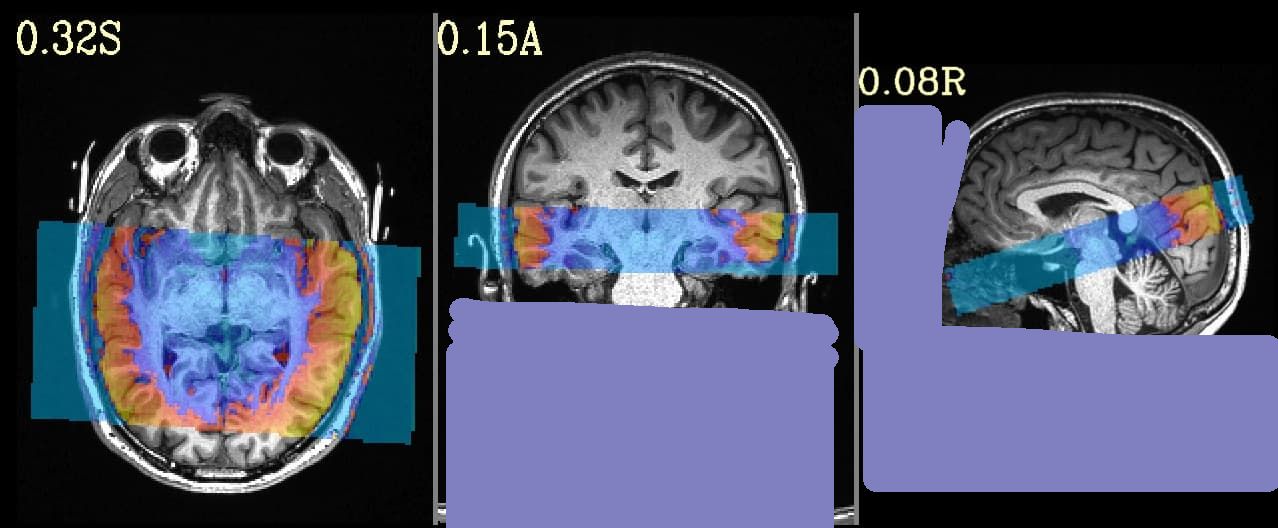
It does work, and I get the correct images for two types of sequences, the one presented earlier with reduced number of slices:

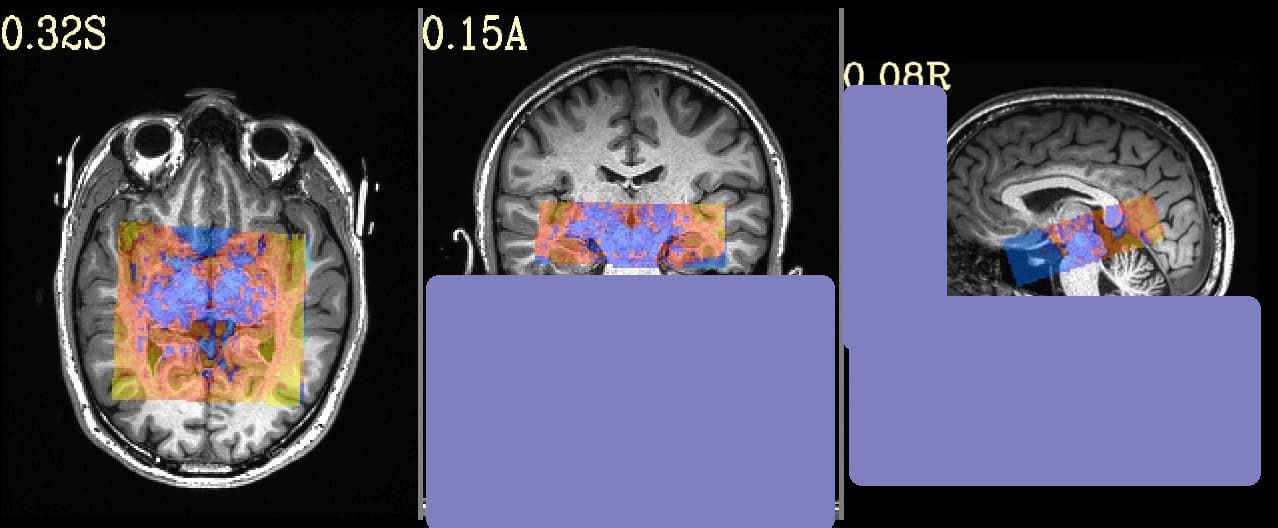
and another test I did with reduced FOV in all directions:

I also noticed that (as you mentionned) the output images are not resampled.

So that is fine. I then run sswarper2 and after that afni_proc with different options (with or without whole EPI as external dataset, with or without -large_move, with -align_unifize_epi local or with -align_opts_eunif "-sharpen_with_phi 0.5 -automask_tool '-dilate_inputs 10 -10' "). So far, it does not work for the dataset with full FOV and reduced number of slices while it does work for very reduced FOV sequence.

From full FOV and reduced number of slices:

From reduced FOV in all directions:

I am careful because I might have done a mistake either by misunderstanding or by distraction, so I join one of the scripts I ran on the full FOV with reduced number of slices sequence:

set subdir="../derivatives/deob/sub-mst"

afni_proc.py                                                                 \
            -subj_id                  mstL                                   \
            -out_dir			$subdir/mstL.results	             \
            -copy_anat $subdir/anat/o.ssw_sub-mst/anatSS.sub-mst.nii         \
            -anat_has_skull           no                                     \
            -anat_follower anat_w_skull anat $subdir/anat/sub-mst_ses-20251201154217_T1w.nii.gz \
            -dsets $subdir/func/sub-mst_ses-20251201154217_task-cmrr_run-01_bold.nii.gz \
            -blocks                   align tlrc volreg mask blur     \
                                      scale regress                          \
            -radial_correlate_blocks  tcat volreg                            \
            -tcat_remove_first_trs    0                                      \
            -align_unifize_epi        local                                  \
            -align_opts_aea           -cost lpc+ZZ                           \
                                      -large_move                            \
                                      -check_flip                            \
            -align_epi_ext_dset       "$subdir/func/sub-mst_ses-20251201154217_task-full_bold.nii.gz[4]"                \
            -tlrc_base                MNI152_2009_template_SSW.nii.gz        \
            -tlrc_NL_warp                                                    \
            -tlrc_NL_warped_dsets     $subdir/anat/o.ssw_sub-mst/anatQQ.sub-mst.nii             \
                                      $subdir/anat/o.ssw_sub-mst/anatQQ.sub-mst.aff12.1D        \
                                      $subdir/anat/o.ssw_sub-mst/anatQQ.sub-mst_WARP.nii        \
            -volreg_align_to          last                                   \
            -volreg_align_e2a                                                \
            -volreg_tlrc_warp                                                \
            -volreg_compute_tsnr      yes                                    \
            -mask_epi_anat            yes                                    \
            -mask_apply               epi                                    \
            -blur_size                3.0                                    \

Best,
Jonathan

Hi, Jonathan-

Huh, well, I'm glad it's working for the one case. It's odd that is isn't happy with the other case, which I would have thought would be the easier of the two...

I will hazard a guess that the difference might be that the automasking of the larger FOV is more problematic, because of the larger brightness inhomogeneity across it: in the first image of your previous post, there is the small amount of red (=larger vals) with a lot of blue (=smaller vals), and that might cause the automasking woe, like in the local unifizing even with some dilation.

One thing you could try is removing the -large_move; if the EPI and anatomical are well-aligned to start, no need to have a large parameter space to search/try for fitting. I will ponder...

--pt

OK, in further dialogue with @jberrebi , I think we have an AP setup that is working well for the full-slab case, as tested across a few datasets and a couple different sequences. I copy+paste some of the descriptive text here:


I think the primary thing happening was that the EPI "skullstripping" was somewhat haphazardly getting rid of some chunks outside the brain and including some others.

  • So, for more reliability of outcomes, I turned that off, via adding this as an additional arg to "-align_opts_aea": -epi_strip None.
  • Now, since the EPI will have more non-brain material, I figured it might make more sense to have the non-brain material outside the skull in the anatomical left on, because that can also match. So, I changed the main input anatomical to be the skull-ON version, from the unifizing wtihin SSW: -copy_anat ${sdir_ssw}/anatU.${subjid}.nii*; I also left -anat_has_skull no, which is technically a lie to AP, but I don't want it to skullstrip this.
  • then, I made the skullstripped dset be passed along as a follower, via: -anat_follower anat_wo_skull anat ${sdir_ssw}/anatSS.${subjid}.nii* (NB: this combined with the previous option means I just switched around the copy_anat and anat_follower dsets from my usual SSW routine; this is all OK, because the warp has already been calculated, and is just handed over to AP as normal.)

(Minor note, which really didn't matter: since the initial EPI-anatomical overlap is actually pretty good, I initially also removed the "-large_move` from that same AP option. I also did a later run with the above options leaving this in. In both cases, the results were the same, and good, so this didn't really affect things here; I left it in below.)

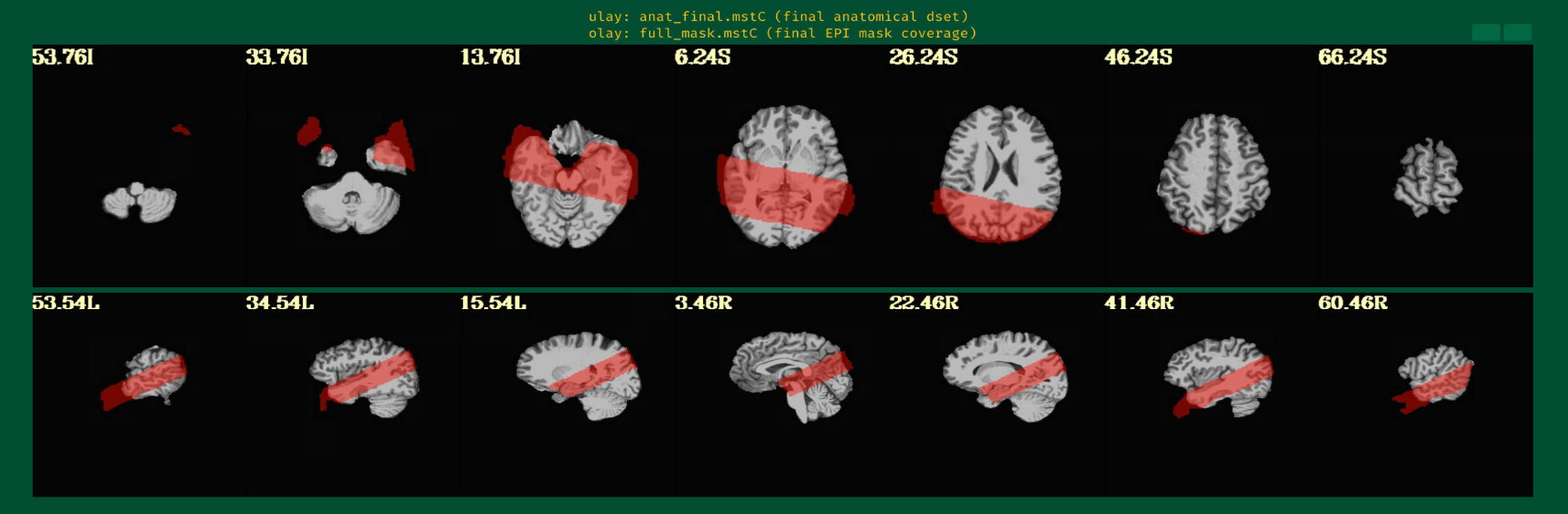
After doing that, the alignment stuff seemed to work well. This is the EPI-anatomical overlap (when obliquity is being applied, so the "true" starting position for alignment):


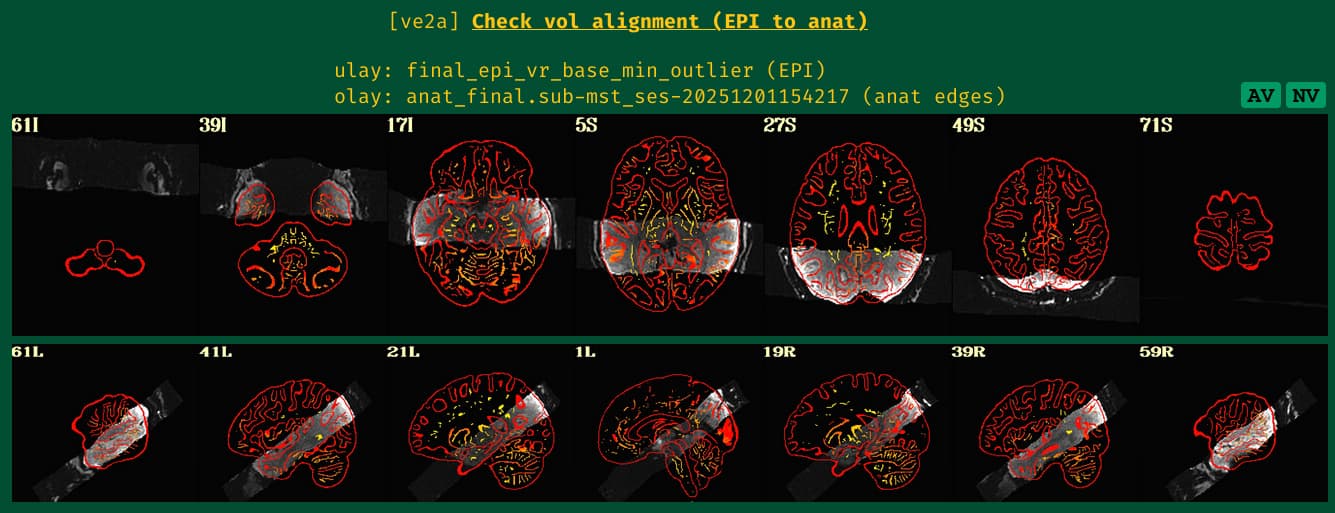
... and then this is the EPI-anatomical overlap from AP, and all sulci/gyri/boundaries seem to be in good spots, and similar to the initial part:

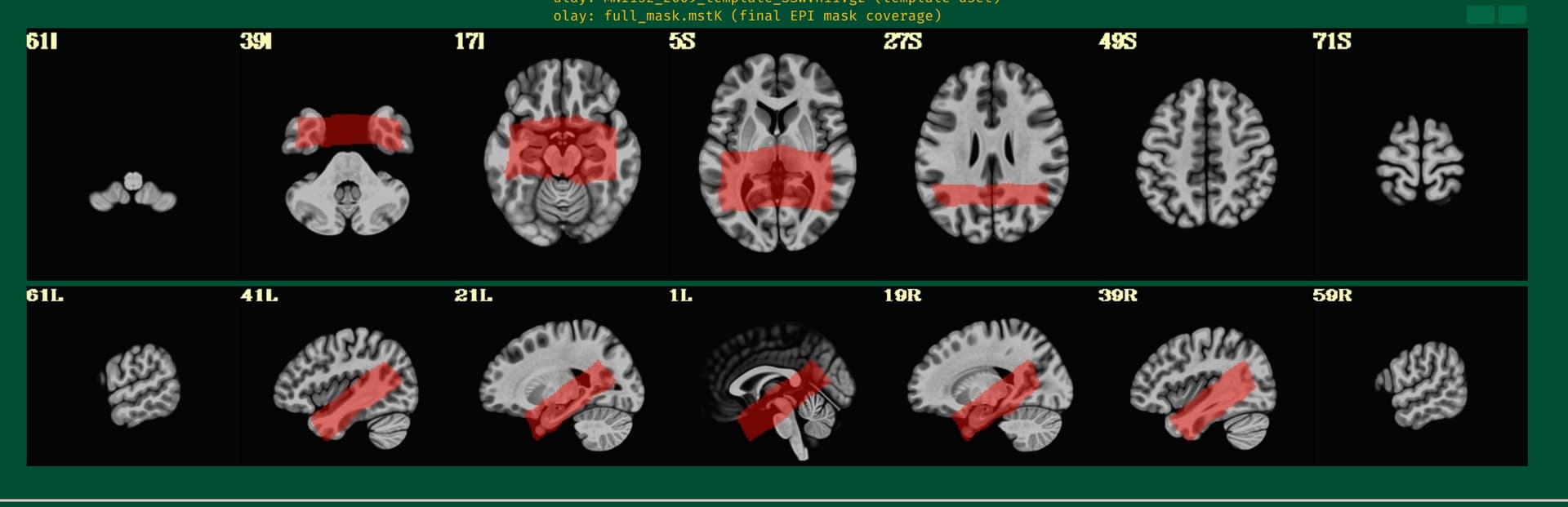
and, for what it's worth, this is where the mask sits (it is basically the full EPI slab, intersected with a mask created from the warped anatomical in template space that was handed over as part of -tlrc_NL_warped_dsets):

So, in the end, my main AP command (NB: the regress block options here are basically not added for any real processing, but they don't affect the alignment per se so I didn't do anything realistic with them besides what is here):

afni_proc.py                                                                 \
    -subj_id                   ${subjid}                                     \
    -dsets                     ${dset_epi}                                   \
    -copy_anat                 ${anat_skull}                                 \
    -anat_has_skull            no                                            \
    -anat_follower             anat_wo_skull anat ${anat_cp}                 \
    -blocks                    align tlrc volreg mask                        \
                               blur scale regress                            \
    -radial_correlate_blocks   tcat volreg regress                           \
    -tcat_remove_first_trs     ${nt_rm}                                      \
    -align_unifize_epi         local                                         \
    -align_opts_aea            -large_move                                   \
                               -cost lpc+ZZ                                  \
                               -epi_strip None                               \
    -tlrc_base                 ${template}                                   \
    -tlrc_NL_warp                                                            \
    -tlrc_NL_warped_dsets      ${dsets_NL_warp}                              \
    -volreg_align_to           MIN_OUTLIER                                   \
    -volreg_align_e2a                                                        \
    -volreg_tlrc_warp                                                        \
    -volreg_warp_dxyz          ${final_dxyz}                                 \
    -volreg_compute_tsnr       yes                                           \
    -mask_epi_anat             yes                                           \
    -blur_size                 ${blur_size}                                  \
    -regress_motion_per_run                                                  \
    -regress_run_clustsim      no                                            \
    -html_review_style         pythonic

Above, a few variables are left in.

  • The ${dsets_NL_warp} are the 3 dsets typically handed to AP after using sswarper2:
    ssw/anatQQ.${subj}.nii                 \
    ssw/anatQQ.${subj}.aff12.1D            \
    ssw/anatQQ.${subj}_WARP.nii            \
    
  • the ${anat_cp} is the anatomical dset without skull that is also output by sswarper2 (= ssw/anatSS.${subj}.nii, which would normally be the the -copy_anat .. input, but is not here.
  • the ${anat_skull} is the anatomical dset with skull that is an intermediate output by sswarper2 (= ssw/anatU.${subj}.nii, which has skull but has been unifized in terms of brightness a bit).

--pt

1 Like