motion parameters afni -rt (with Dimon) vs afni after dcm2niix

AFNI version info (afni -ver):

Precompiled binary linux_ubuntu_16_64: May 23 2025 (Version AFNI_25.1.11 'Maximinus')

Hi,
I am trying to compare the motion parameters for a dataset processed with realtime afni and those obtained with just afni after converting data with dcm2niix.

The starting point is some data acquired with last year on our previous software platform Siemens VE11C, i.e. with good old Mosaic Dicoms (my aim at the end is to see compare these motions parameters the same way with the current software XA60 and enhanced DICOMs, but one step at a time).

Real time processing
first terminal window: realtime_receiver.py -show data yes
second terminal window:

setenv AFNI_REALTIME_Registration  3D:_realtime
setenv AFNI_REALTIME_Base_Image    0
setenv AFNI_REALTIME_Graph         Realtime
setenv AFNI_REALTIME_Resampling   cubic
setenv AFNI_REALTIME_MP_HOST_PORT  localhost:53214
...
setenv AFNI_REALTIME_SHOW_TIMES    YES
setenv AFNI_REALTIME_Mask_Vals     Motion_Only
setenv AFNI_REALTIME_Function 	   FIM
afni -rt -yesplugouts

followed by: Dimon -infile_prefix $pref -assume_dicom_mosaic -rt -quit

Offline processing
I start by converting the DICOMs with dcm2niix:

dcm2niix -o outputDir dicomDir

Then I run the following, which I am assuming is relatively close to what afni realtime afni does:

3dTcat -prefix pb00.tcat \
   outputDir/myfiles.nii'[0..$]'

3drefit -Tslices 1.110 0.000 0.740 0.062 0.803 0.125 0.865 0.185 0.925 0.248 0.988 0.310 1.050 0.433 1.173 0.495 1.235 0.555 1.295 0.618 1.358 0.680 1.420 0.370 1.110 0.000 0.740 0.062 0.803 0.125 0.865 0.185 0.925 0.248 0.988 0.310 1.050 0.433 1.173 0.495 1.235 0.555 1.295 0.618 1.358 0.680 1.420 0.370  pb00.tcat+orig

3dTshift -tzero 0 -quintic -prefix pb01.tshift \
             pb00.tcat+orig
             
3dvolreg -verbose -base 0                    \
             -1Dfile dfile.RT.1D -prefix pb01.volreg \
             -cubic                                                 \
		pb01.tshift+orig

I have also run the same script without 3drefit and 3dTshift, and called that curve "no Slice Ttiming".

I hope I was careful to notice that in realtime_receiver, the order of the output is

dS  dL  dP roll pitch yaw 

while the order of the output file from 3dvolreg is:

roll pitch yaw dS  dL  dP

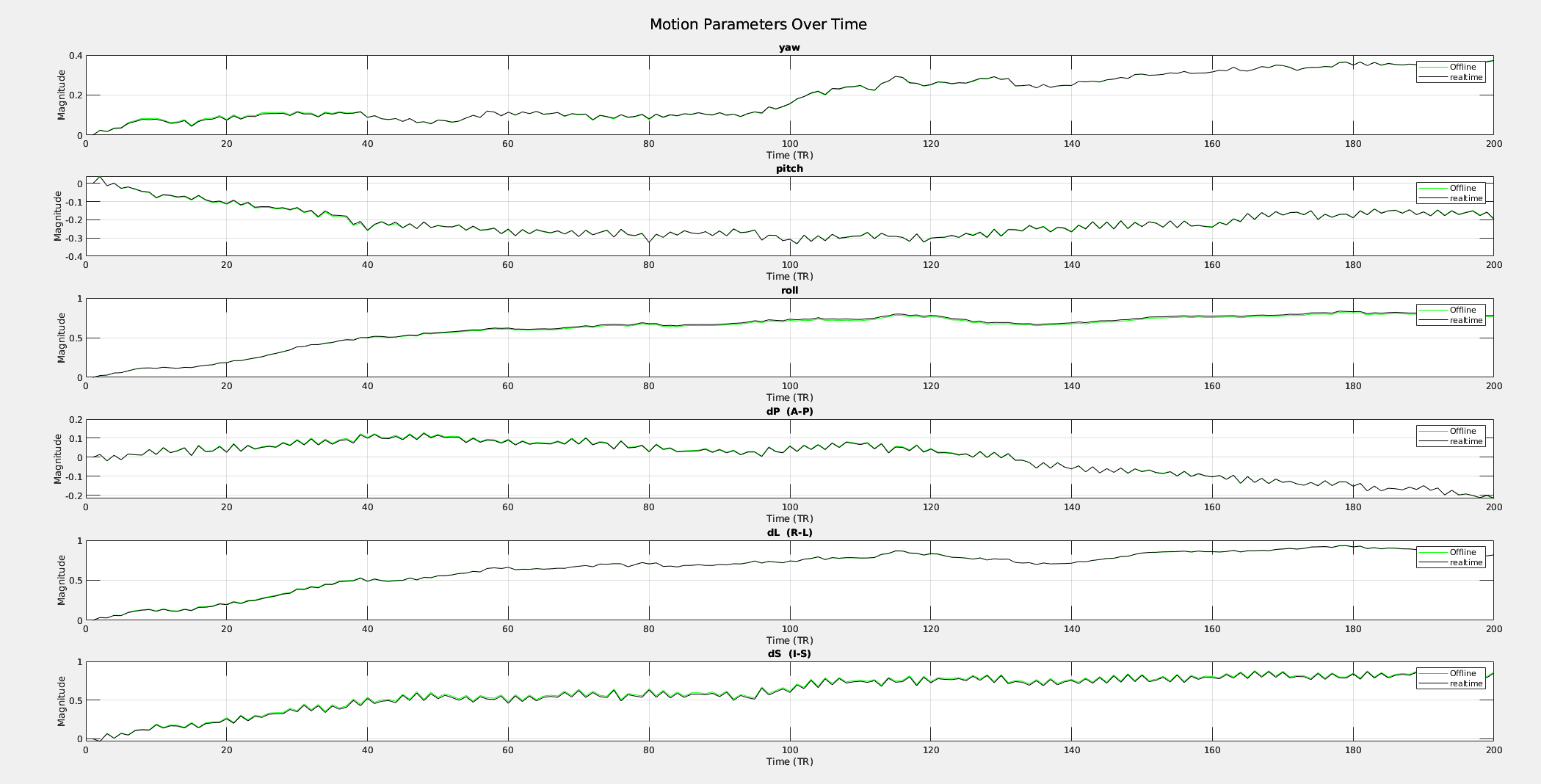
The figure, I plotted in Matlab takes the same order as the realtime graph. The black curves are from the real-time processing. Big trends and moves happen at the same time, but not always in the same direction and not with the same amplitude.

Is there a way to get my offline script closer to what realtime afni does?

I am joining as attachment, the outputs from afni, as well as the motion parameters

(I guess that the estimate from the offline is probably more exact, but I am trying to do a "calibration" for real time work so that is why I am trying to reproduce the estimate from real-time).
Sorry, the last message was long and I can actually ask the question in a much more digest way.

Is it possible to tune options of AFNI functions like 3dvolreg in order to get the same estimation of motion parameters than when we process the images in real-time AFNI through DImon?

Thanks for the bump. I was out for a while when you first posted.

This question is clear, thanks. A couple of years back I tried the same thing (when making the APMULTI_Demo2_realtime package), and did not quite succeed. Most differences were nothing, but there were some. I have not taken a dive into the code to see where those differences might arise from. One might guess that the RT version is a little more optimized for speed and so might have slightly different choices, plus this code is 27 years old. But anyway, I have not taken the time to go in and figure this out.

On a related topic, Dimon can be used to convert to AFNI/NIFTI in either realtime mode or by calling to3d. When processing a study, I recommend using the latter. Realtime is great for a realtime experiment, but it is not as robust as having Dimon run to3d via a GERT script.

Anyway, I would also like to understand those (typically early-run, if I recall correctly) differences between afni -rt volreg and 3dvolreg. Are you seeing anything notable?

-rick

Thanks! I 'll remember about applying to3d.

I am afraid I did not understand your last question. Do you mean that the differences between afni -rt together with AFNI_REALTIME_Registration 3D:_realtime and a conventional 3dvolreg should be mostly visible at the beggining of a run because of unstability in the signal?

The comparison is interesting in itself. But I guess I will have to find another way to check for errors and validate code for realtime motion estimation on Siemens enhanced DICOMS. My idea was to process these dicoms realtime (for which I have on another computer slightly modified or rather appended in the source code code of mri_read_dicom) and offline and and compare the motion estimation. So in order to do that, I wanted first to check that it is possible to compare realtime and offline processing with old-style MOSAIC dicoms. Hence my original question about whether it’s possible for 3dvolreg and AFNI real-time volreg to produce the same results.

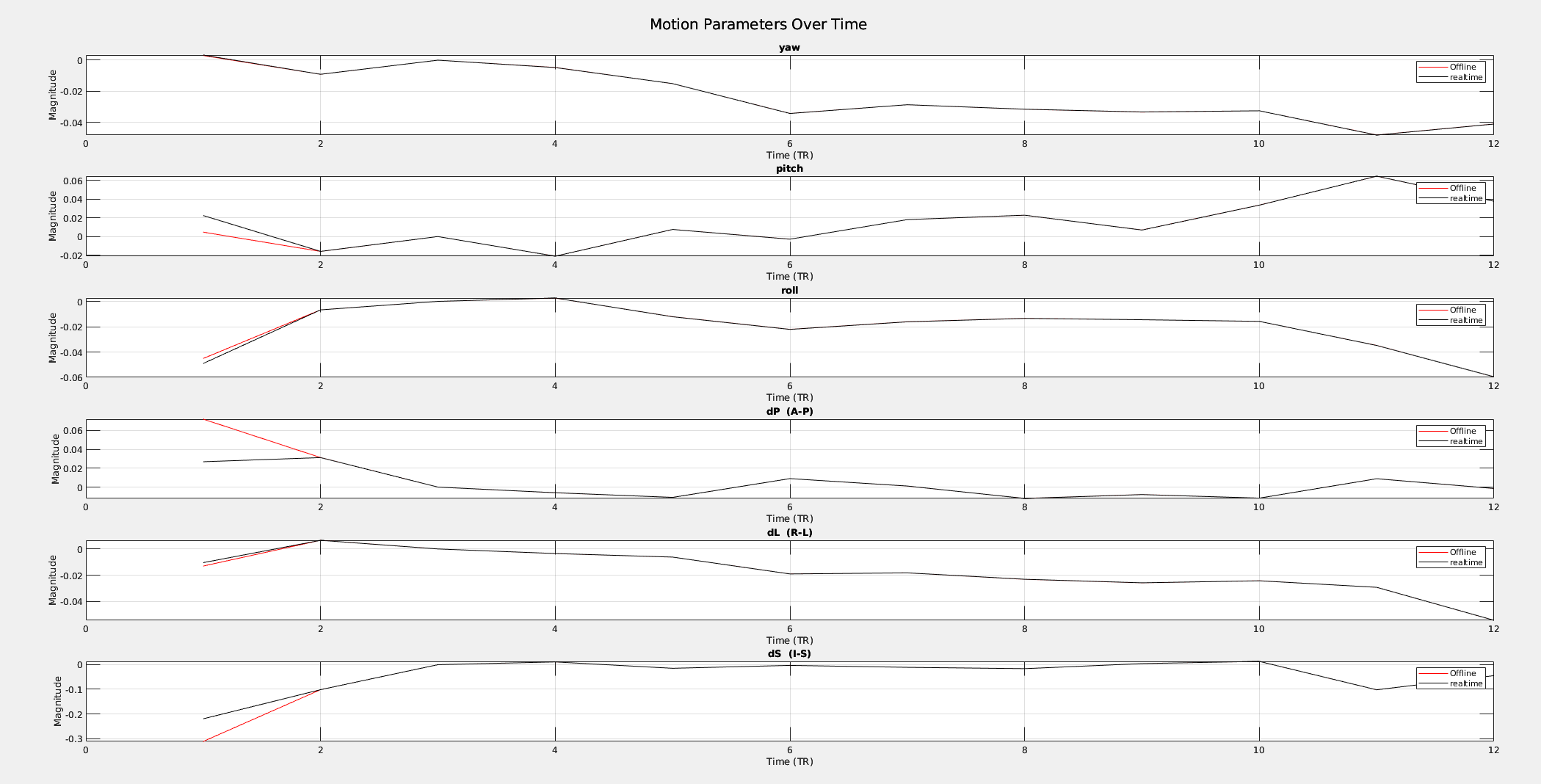
Okay, so I just ran this again, using rt.02 from APMULTI_Demo2_realtime (though it uses only 12 volumes). The only difference here is in output is for volume 0. Other than that, the motion parameters are identical (once I forced 3dvolreg to use exactly 5 decimal places for the -1Dfile output), and the 4D datasets are identical (though volume 11 had a difference of +/- 1 in some voxels, a truncation difference).

It is not clear why volume 0 comes out differently, but at least everything else is the same (give or take 1).

-rick

Thank you Rick.
I have found and installed APMULTI_Demo2_realtime and I made it run in 3 terminal windows as the readme suggests. So I got the "realtime" motion parameters. That works.
Now I am trying the run the dicoms under RT_inputs/dicom_12_vols. You suggest using Dimon to run to3d even in that case. I run "Dimon -infile_pattern '../../RT_input/dicom_12_vols/*.dcm' -gert_create_dataset" but it does not seem to be correct. Is it because of the multi-echo feature? I get a 3D output only.

For this simple test, I did not run Dimon separately, but used the unregistered EPI from afni -rt as input to 3dvolreg (rt.__001+orig). This dataset is identical to what Dimon -> to3d creates (I just don't quite trust that meta data in all cases will be similarly applied).

If you want to compare Dimon->to3d vs Dimon->afni -rt, consider using rt.02.ROIaves for example. It uses a cmd.dimon file that looks like:

Dimon -rt -no_wait -infile_pattern "../RT_input/dicom_12_vols.e2/naming*.dcm"

which could be changed to a GERT version:

Dimon -gert_create_dataset -infile_pattern "../RT_input/dicom_12_vols.e2/naming*.dcm"

And note that while rt.05.ME.OC and rt.06.ME.OC.aves process all 3 echoes, the others only process echo 2. When evaluating RT vs 3dvolreg, it makes sense to start with a single echo. So I have be playing under rt.02.ROIaves.

Note that the realtime script uses an external volreg base. You can either duplicate that with 3dvolreg or change the cmd.afni script to just use an index from the current input, such as 2. That's what I did, to just stay local.

-rick

P.S. Keep in mind that you need to duplicate both the -base and the resample mode (and any other realtime options) in your 3dvolreg command, e.g.

3dvolreg -base 2 -quintic -1Dfile dfile.1D -prefix vr.2 rt.__001+orig

-rick

That worked as you said!
I used the original file cmd.afni in rt.02 but modified a couple of options which I reported exactly to 3dvolreg as you adviced.

#setenv AFNI_REALTIME_Reg_Base_Mode     External_Dataset
#setenv AFNI_REALTIME_External_Dataset  $exdir/vr_base+orig
setenv AFNI_REALTIME_Base_Image        0
setenv AFNI_REALTIME_Reg_Base_Mode  Current_Run
setenv AFNI_REALTIME_Resampling   Quintic
#setenv AFNI_REALTIME_Mask_Vals     ROI_means
setenv AFNI_REALTIME_Mask_Vals     Motion_Only

I run both directly from the output of Dimon -rt ( rt.__001+orig), and from the output of Dimon -infile_pattern '../../RT_input/dicom_12_vols.e2/*.dcm' -gert_create_dataset, and plotted with the matlab routine, and I got the following graph:

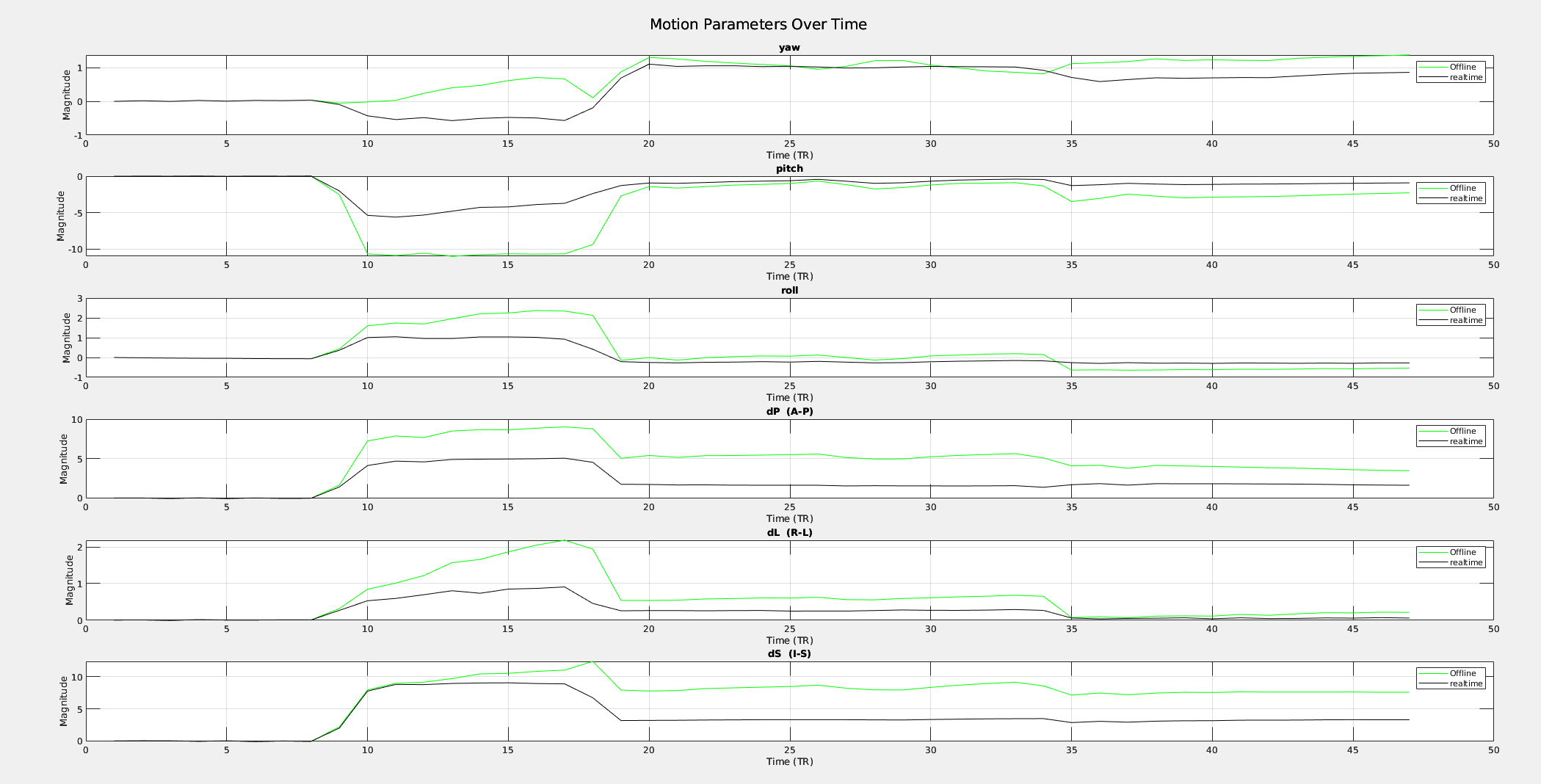
So, next, I changed the dicom directory to my mosaic dicoms, I added -assume_dicom_mosaic which did not seem to be necessary as the code seems to recognize mosaic, and I run that the same way in a copy of APMULTI_Demo2_realtime/ROIaves. I got the exact same graphs as in my first email. except, that I removed the version that was slice-time corrected since it is not performed in real-time:

So I guess that the problem comes from the MOSAIC. Concerning my project, now I know I should be able to run afni -rt (Dimon -rt) and obtain very similar results to the outputs from 3dvolreg on offline data. Thank you.

That's great for the demo data, not so good for yours. The mosaic should not matter here, unless something is being interpreted incorrectly. Otherwise, just be sure that the base images and the resampling modes match.

Thanks,

-rick

P.S.: Sorry, I should have checked that before. It could be so that the outlier fraction of my dataset was really too big (and also visually, the time series shows big movements). So the estimates were probably erroneous anyway.
As it was easier to find a new enhanced real-time dataset with low outlier fraction than an old Mosaic one, I run directly the same test on enhanced dicoms and it seems to be the same for real-time through Dimon and offline through dicoms--> nifti --> 3dvolreg (Dimon works for the moment with enhanced only with "-rt" so I had to convert to nifti)

That's great to see, thanks for the update!
-rick