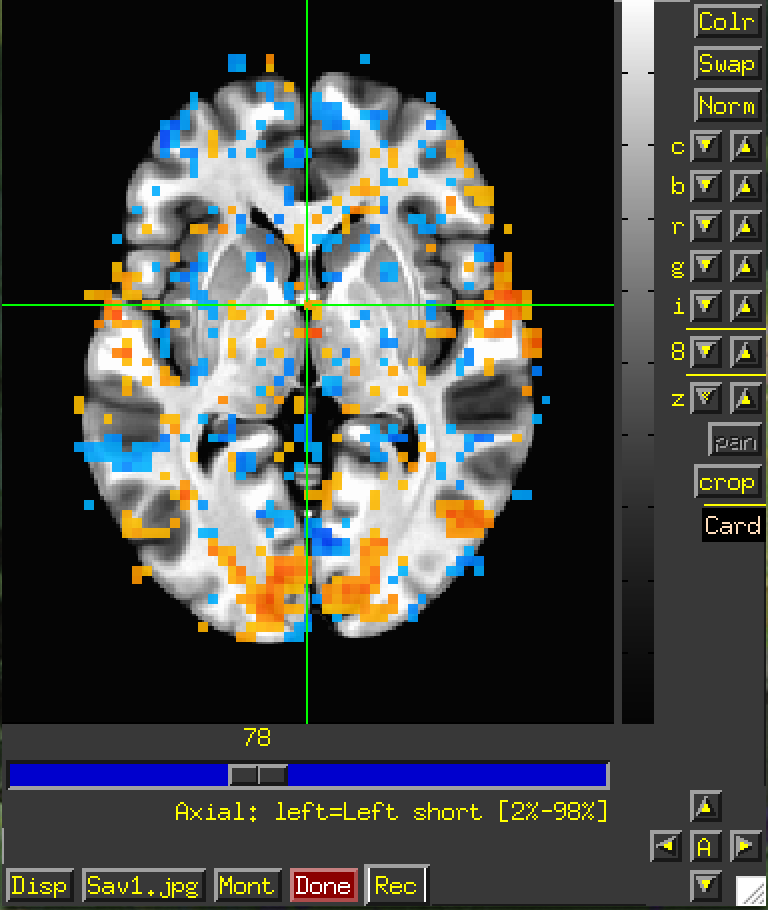
AFNI Overlay Size Mismatch with Underlay

AFNI version info (afni -ver): Precompiled binary macos_13_ARM: Oct 28 2025 (Version AFNI_25.2.18 'Gordian I')

I currently visualizing a BOLD image onto a standard template (MNI152_2009_template_SSW). The BOLD image was acquired with 3mm voxel sizes, and after processing was resampled using 3dResample to match the 1mm voxel size of the standard template for visualization.
As you can see, the BOLD image overlay is larger than the standard underlay, and the overlay data spills out of the "bounds" of the underlay image. I am not sure if it is possible to fix this and have the BOLD data align with the standard template, but if anyone has a solution please let me know.

Thanks

Howdy-

So these are final stats results being displayed at the end of processing? It might help to see your 3dresample command, but indeed resampling shouldn't change the extents.

Just to check, have you verified that during the FMRI processing, each step of alignment (EPI to anatomical and anatomical to template), the alignment was successful? Success would be defined as having good matching of structure boundaries, like ventricle edges, gray-white boundary, sulcal patterns, and the edge of the brain. That should be verified first using, say, the APQC HTML images, such as in Fig 7 of here or Fig 4 of here. For the AFNI Academy tutorial playlist about alignment considerations, please see here.

Some other considerations:

  • Note also that to overlay results in the AFNI GUI, you don't have to resample data to the same grid as the underlay. The AFNI GUI works by coordinate values, not voxel counting. In general, we probably wouldn't recommend upsampling FMRI data from 3mm to 1mm during processing (that is actually discussed a bit here, among other processing recommendations). It's not possible to create higher res info, even if the data looks smoother after processing. It will also greatly increase your file size and runtime for processing, perhaps even up to 27 more or so.

  • Also, we tend not to mask the data when processing, again like when using afni_proc.py, so we can see modeled results everywhere. That helps see if there are alignment problems, distortion/dropout effects, ghosting, or other artifacts.

  • FMRI data is also noisy, so there can be little blobs that appear on the edge/stretching out of the brain a bit, esp. by draining veins (as a magnetic effect).

--pt

Hello,

Thank you for your response.

These are final stats results displayed at the end of processing. I do not preprocess my data using AFNI but rather with fMRIprep and tedana, so this might be where my data converges. I then take it into AFNI for smoothing, correlational analyses, visualization, etc.

My 3dresample command is as follows:

3dresample \
-master ~./afni_build/afni_atlases_dist/MNI152_2009_template_SSW.nii.gz \
-input path/to/file/Tcorr_r_001+orig \
-prefix Tcorr_r_001_resamp

I have validated that the alignment was successful through preprocessing reports. That's interesting you say data resampling is unnecessary, because I was unable to visualize the data with the standard underlay without doing resampling. Would you recommend downsampling the standard template to match my data? I see this "spilling" across all of my BOLD data when overlayed on a standard template.

Thank you so much,

-- R

Hi, R-

OK, then if the alignment was good at those earlier stages, then that is where the data should be. Note that depending on how you smooth the data, that can "push" the extent of the data outside the masking that was performed, and hence you can/will see things outside that mask. Again, I personally would recommend to not mask the data, to be able to see everything everywhere, and have a sense of SNR, artifact, alignment, etc. It is often quite informative.

That 3dresample command seems fine for regridding data if you needed to, but that should not be necessary in this situation if the datasets have appropriate header info.

Looking at your input dataset name, Tcorr_r_001+orig, I can see it is labelled in the header as being in "subject" or "original" space, because of the +orig. In the NIFTI header of your output/processed data, please check and see what the sform_code and qform_code values are:

nifti_tool -disp_hdr -field sform_code -field qform_code -infiles DSET

For a dataset in standard/template space, you should see either 3, 4 or 5 in at least one of those (and either a duplicated number, or one of the pair being 0). These are the agreed upon NIFTI standard values for data in a template space.

  • 3 is specifically Talairach-Tournoux space;
  • 4 is specifically MNI (well, one of the many MNI varieties)
  • 5 is any other template space.

Please see here for more details. These map to the AFNI view space names, like "+orig" or "+tlrc" in the AFNI BRIK/HEAD format filenames (see that same page linked at the start of this paragraph).

In the AFNI GUI, you can't overlay a +orig dset on a +tlrc one, or vice versa. So, the resampling here is not required to regrid your data, the important function it is performing is changing the view space label within the dset here, so your input dataset gets a template-space one from the MNI*SSW.nii.gz header. This is because either Tcorr_r_001+orig is not actually in a template space, or the dataset it was derived from had misleading header info. That can be checked with the above nifti_tool command. Compare that output with running that nifti_tool command on the
MNI152_2009_template_SSW.nii.gz template dset, whose qform_code and sform_code values are both (appropriately) 4.

To see what space and view info the MNI template has, you can run:

$ 3dinfo -space -av_space MNI152_2009_template_SSW.nii.gz
MNI_2009c_asym	+tlrc

Notice how the space info is even more specific than just MNI. This is because there are maaaany flavors of MNI template.

If you want to change just the space info in a dset to match that, you can do it as follows, rather than resampling the data:

# copy the dset, because the next cmd changes header info 'in place'
3dcopy DSET_IN DSET_OUT
# change header info to match the MNI template
3drefit -space MNI_2009c_asym -view tlrc DSET_OUT

After this, even thought DSET_IN and the MNI template wouldn't view together in the AFNI GUI, the header-adjusted DSET_OUT and MNI template will, even though they have different grids, like voxel size, etc.).

--pt