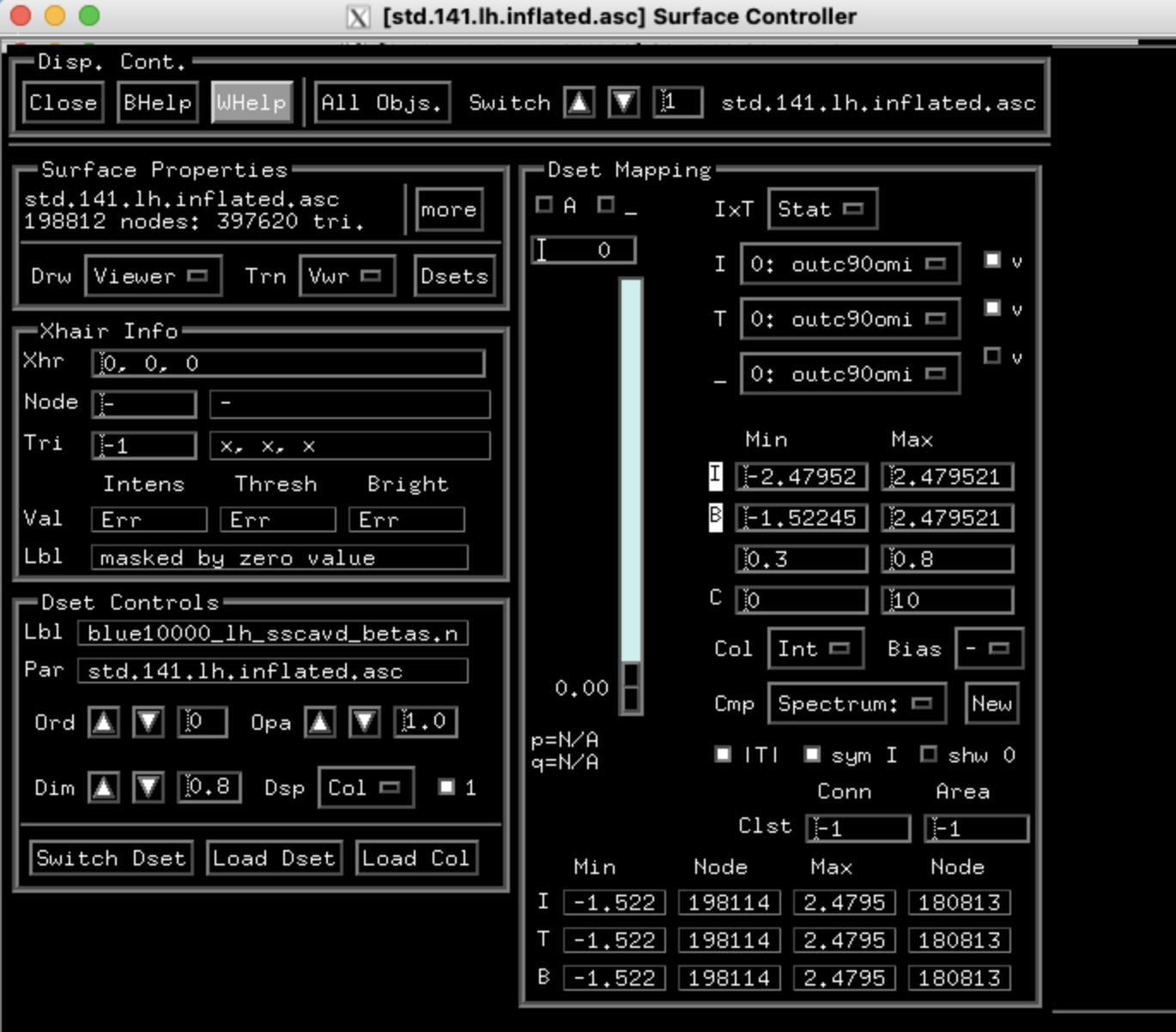
Daniel's macos_x11_suma branch continues to make updates for suma on this side, but those SUMA_XErrHandler and GLXBadContext errors from suma are a different matter. Daniel and I were just looking into that, since one of my systems had the same problem, and we seem to have a solution, or a set of them (mostly done by Daniel).
It seems like some settings under X11 can get corrupted, and it might be enough to simply rewrite them. Start by noting your current setting for enable_iglx, and then probably setting it to zero (make note of the output from the first (read) command):
Since we won't have worry about the other GLX issue from this thread, it seems like now we should just go through this together. I will send you a private message about that.
Hi folks, I'm experiencing a similar issue, where (i) SUMA is black when I initially open it, and the brain only appears if I resize the window and (ii, more important to me) the surface controller isn't displaying the color bar even though the surface dset coloration looks normal.
I'm running MacOS Tahoe (26.3) with an M5 Pro chip, and my afni -ver output is: Precompiled binary macos_13_ARM: Apr 28 2026 (Version AFNI_26.1.00 'Balbinus')
We have spent some time looking into various fixes for this new problem with updated versions of mesa causing suma to show blank windows on the MacOS. This is a completely different issue than the resizing issue of Tahoe (MacOS v.26) and can affect earlier Sequoia (MacOS v.15) release also with both Intel and ARM architectures. The problem is limited to suma, which makes use of the OpenGL libraries from mesa.
The longest-term solution we found is to use a homebrew "tap", copy of an older version of mesa. Thanks to @pmolfese, who made this tap for us, and we forked it to our git repository.
Please see the installation instructions here, and let us know if there are any problems.
I was hopeful that Pete's latest suggestion will solve the suma problem for me but the brew workaround is failing at the installation of mesa@25.3.4 step with the error message below (see below BREW ERROR:). I have also pasted from the meson.log file where the errors originate (see below MESON LOG:). This is on a M1 mac running Tahoe 26.5.1 and I have Xquartz 2.8.6_rc2. Any guidance is much appreciated, SUMA has unfortunately been unusable for months now on our desktops.
The Meson build system
Version: 1.11.1
Source dir: /private/tmp/mesaA25.3.4-20260707-28736-4symv6/mesa-25.3.4
Build dir: /private/tmp/mesaA25.3.4-20260707-28736-4symv6/mesa-25.3.4/build
Build type: native build
Project name: mesa
Project version: 25.3.4
C compiler for the host machine: clang (clang 21.0.0 "Apple clang version 21.0.0 (clang-2100.1.1.101)")
C linker for the host machine: clang ld64 1267
C++ compiler for the host machine: clang++ (clang 21.0.0 "Apple clang version 21.0.0 (clang-2100.1.1.101)")
C++ linker for the host machine: clang++ ld64 1267
Host machine cpu family: aarch64
Host machine cpu: aarch64
Objective-C compiler for the host machine: clang (clang 21.0.0)
Objective-C linker for the host machine: clang ld64 1267
Checking for size of "void*" : 8
Checking if "-mtls-dialect=gnu2" runs: DID NOT COMPILE
Checking if "-mtls-dialect=desc" runs: DID NOT COMPILE
WARNING: Found pkg-config '/opt/homebrew/Library/Homebrew/shims/mac/super/bin/pkg-config' but it failed when ran
Found pkg-config: NO
Did not find CMake 'cmake'
Found CMake: NO
Run-time dependency libglvnd found: NO (tried pkg-config, framework and cmake)
BREW ERROR:
Formula mesa@25.3.4 (25.3.4) Verified 43.4MB/ 43.4MB
==> Installing mesa@25.3.4 from afni/mesa-25.3.4
==> python3.13 -m venv --system-site-packages --without-pip /private/tmp/mesaA25.
==> python3.13 -m pip --python=/private/tmp/mesaA25.3.4-20260707-28736-4symv6/mes
==> python3.13 -m pip --python=/private/tmp/mesaA25.3.4-20260707-28736-4symv6/mes
==> python3.13 -m pip --python=/private/tmp/mesaA25.3.4-20260707-28736-4symv6/mes
==> python3.13 -m pip --python=/private/tmp/mesaA25.3.4-20260707-28736-4symv6/mes
==> meson setup build -Db_ndebug=true -Dgallium-rusticl=true -Dllvm=enabled -Dope
Last 15 lines from /Users/zsaad/Library/Logs/Homebrew/mesa@25.3.4/06.meson.log:
Found pkg-config: NO
Did not find CMake 'cmake'
Found CMake: NO
Run-time dependency libglvnd found: NO (tried pkg-config, framework and cmake)
Program glslangValidator found: YES (/opt/homebrew/opt/glslang/bin/glslangValidator)
Dependency libva for host machine skipped: feature gallium-va disabled
meson.build:763: WARNING: add_languages is missing native:, assuming languages are wanted for both host and build.
Rust compiler for the host machine: rustc -C linker=clang (rustc 1.96.1 "1.96.1")
Rust linker for the host machine: ld64 1267
Program bindgen found: YES (/opt/homebrew/opt/bindgen/bin/bindgen)
Run-time dependency libclc found: NO (tried framework)
meson.build:851:12: ERROR: Dependency lookup for libclc with method 'pkg-config' failed: Pkg-config for machine host machine not found. Giving up.
A full log can be found at /private/tmp/mesaA25.3.4-20260707-28736-4symv6/mesa-25.3.4/build/meson-logs/meson-log.txt
If reporting this issue please do so at (not Homebrew/* repositories):
I have the same configuration as you, so I think it should work. mesa just fixed itself, but it will take time to propagate to homebrew. You can make suma work with its own non-homebrew install of mesa, but it will be a similar build as this. The error is in the pkg-config step; it's using a particular version in another package. Try reinstalling pkg-config with
Thanks for the tip but unfortunately it did not do it. Where else can I get mesa from ? Any chance I can get a precompiled version along with the fixed mesa?
The mesa upgrade did not do it, though I see the libGL dylib is pointing to the upgraded version. The shellenv command returned a blank. cmake is under homebrew/bin though when I run which from my shell (zsh).
But, I realize my binaries are macos_10.12_local, perhaps those are linking to a static or an older library?
@ZXu Getting pkg-config to work is the main hurdle. If you can't do it, it would be useful to see why. The alternative method with a binary copy was my first attempt at fixing this, and it worked (!) from a similar system to another. It shouldn't be as robust to upstream dependency changes though, so we don't recommend it, but I'll put the procedure and link below.
# this procedure works around this using older version 26.0.1_1
# regular install (mesa at 26.0.5, yesterday at 26.0.4)
# skip if mesa is already installed
brew install mesa
brew install mesa-glu

# patch install with 26.0.1_1
cd /tar xzvf \~/brewmesa_26.0.1_1.tgz
cd /opt/homebrew/opt/

# make mesa the old version through symbolic link
# Cellar can contain multiple versions, but link
# sets version that is used
rm /opt/homebrew/opt/mesa
ln -s ../Cellar/mesa/26.0.1_1 /opt/homebrew/opt/mesa

# suma won't start because of MacOS security for unknown files
# but can get around this xattr command
# did this as user with afni already installed and admin privileges
sudo xattr -d com.apple.quarantine /opt/homebrew/opt/mesa/lib/libGL.1.dylib
sudo xattr -d com.apple.quarantine /opt/homebrew/opt/mesa/lib/libgallium-26.0.1.dylib
Thanks Daniel, will give these recommendations a shot once I have a better internet connection. In the meanwhile, I am wondering whether I am using the wrong set of binaries. My afni version is: Precompiled binary macos_10.12_local: Jul 6 2026. Does local refer to a local build with links to static libraries? I wonder whether I should be trying a different version.
That's a version for an older OS. I think it still uses shared libraries, but it's not built against the ones on the more recent MacOS systems. Instead we build from source on newer systems. My afni -ver shows "Precompiled binary macos_13_ARM" even though it's not "Precompiled" (we need to change that). Use @update.afni.binaries or this build_afni_py command to build from source.
build_afni.py -build_root ~/afni_build
That will fetch the source tree from github and build the latest version.
I don't think it will solve the mesa issue though until you can get to either an older or new version of mesa.
Pete points out the latest version of mesa in homebrew is the fixed version now. That would normally be available as a "bottle" as binaries. It's odd that you can't get that to install. Try an uninstall and then install. Make sure the old version is not pinned (brew unpin mesa).
The old 10.12 version is built for Intel CPUs. Tahoe and mesa do not deal well with mixed Intel, ARM binaries from executables and universal libraries with the Rosetta compatibility. There is a discussion here about a fix for that different mesa issue. https://github.com/XQuartz/XQuartz/issues/446
@update.afni.binaries -package macos_13_ARM seems to have done it, I suspect updating the latest mesa was part of the fix, but not without the macos_13_ARM on my M1.
Thanks a lot for your help, I was beginning to despair!
The
National Institute of Mental Health (NIMH) is part of the National Institutes of
Health (NIH), a component of the U.S. Department of Health and Human
Services.